There is no single best browser for privacy. There is a best one for your situation, and the recommendation splits on one question: will you change settings, or not? If the answer is no, install Brave or DuckDuckGo and you're genuinely better off with zero effort. If you'll spend ten minutes configuring, Firefox hardened is the most flexible choice, and Mullvad Browser or LibreWolf give you near-maximum protection out of the box. Tor Browser is the right tool for a small set of situations and overkill for the rest. Below: the reasoning, what each pick costs you, and verdicts on the browser you're probably using right now. Facts are current as of September 6, 2026. This corner of the market changed a lot in August.
The short answer: the best browser for privacy, by situation
| Your situation | Use this | Why |
|---|---|---|
| Want privacy, won't touch settings | Brave (ignore the crypto) | Strongest out-of-the-box blocking of any mainstream browser |
| Want the simplest possible thing | DuckDuckGo | Fewest features to misunderstand, aggressive defaults |
| Comfortable with settings, want control | Firefox, hardened | Full uBlock Origin, huge extension ecosystem, no ad-company owner |
| Want near-Tor privacy at normal speeds | Mullvad Browser or LibreWolf | Tor Browser's anti-fingerprinting (Mullvad) / hardened Firefox preconfigured (LibreWolf) |
| Genuinely need anonymity | Tor Browser | Hides your IP from the sites you visit, at a real speed cost |
| Staying on Chrome regardless | uBlock Origin Lite + realism | See our post-Manifest-V3 ad blocker guide |
How we judge the best browsers for privacy
Four criteria, each applied in our deeper reviews: default protection (what's blocked before you touch anything), ad-blocking capability now that Chrome's Manifest V3 killed full uBlock Origin, business-model incentives (who pays for the browser, and with what), and track record (documented incidents, handled openly rather than ignored).
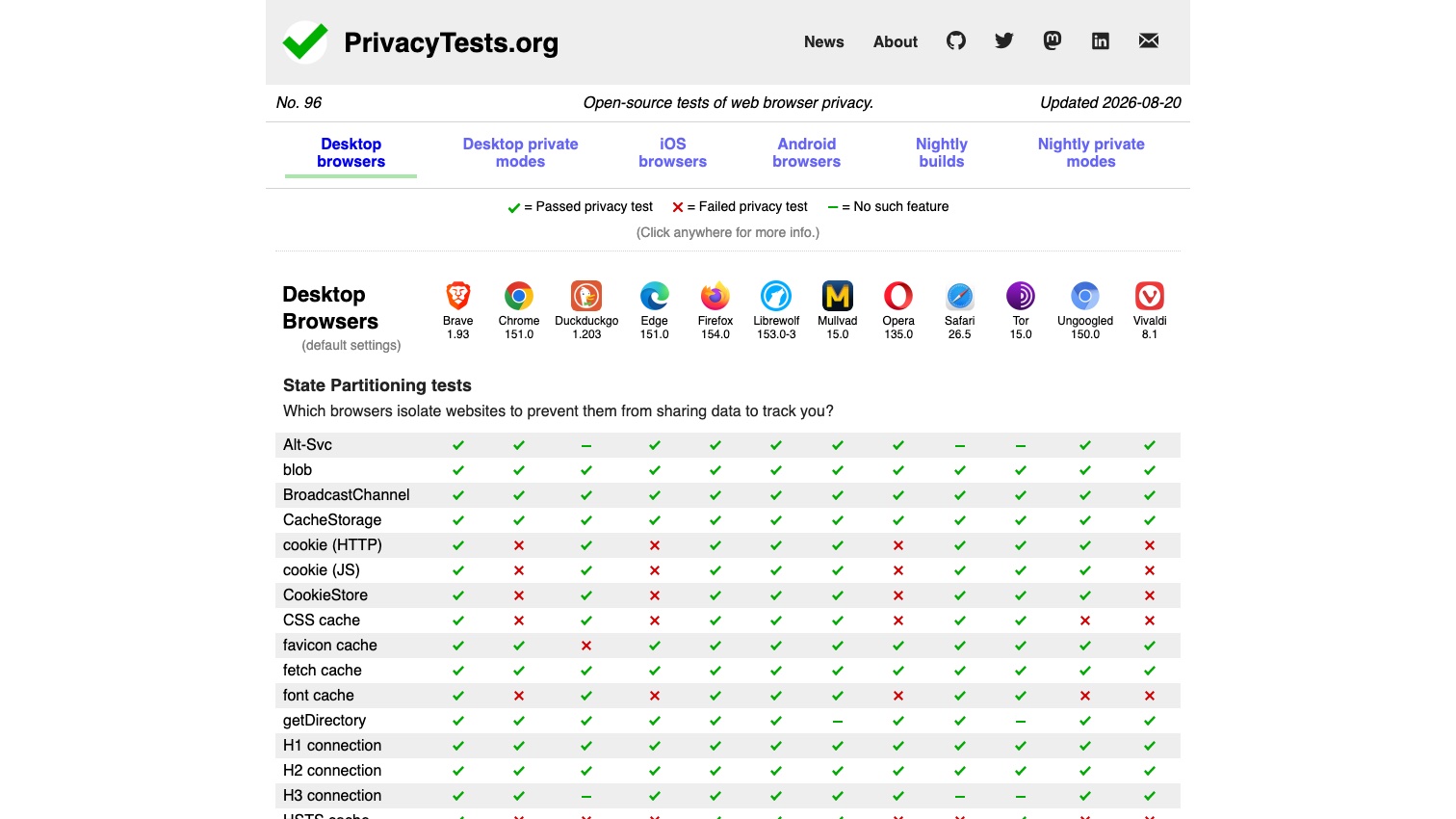
Independent test data exists and is worth reading with one disclosure. PrivacyTests.org runs automated privacy tests against every major browser at default settings, and its creator, Arthur Edelstein, spent several years on Brave's payroll while running it. His disclosure page (updated October 2025) now lists Brave alongside Mozilla and the Tor Project as former employers and says the project has always been run independently, with the test code public for anyone to rerun. Its results broadly match the EFF's fingerprinting tool, Privacy Guides' recommendations, and community consensus, which is why we still cite it, caveat attached.
One thing the default-settings tests don't show: how much junk an ordinary page carries. When we screenshot people-search sites for our opt-out guides, the opt-out pages themselves arrive wrapped in consent banners and ad slots that we have to strip before the form is even legible. That is the traffic a good blocker removes before you see it.
Brave: best for most people
Brave blocks ads, trackers, and fingerprinting by default with engineering that doesn't depend on Chrome's extension rules: Shields is native code, and Brave states plainly that Manifest V3 "will not weaken Brave Shields in any way." It's Chromium-based, so every site works, and it still runs the full uBlock Origin if you want it. The costs: a crypto/rewards layer you'll want to switch off, and a corporate track record with real (fixed, disclosed) stumbles. Both are covered in our full Brave review, along with the ten-minute settings checklist that turns Brave into its quiet, hardened self.
DuckDuckGo: the simplest genuine upgrade
The DuckDuckGo browser is the recommendation for the person who will never open a settings page: tracker blocking built on its own Tracker Radar dataset, Global Privacy Control on by default, a one-tap Fire Button that erases everything, and a search engine that still returns a plain list of links. Its limits are search-result quality (Bing-sourced) and thin extension support. The 2022 Microsoft-trackers controversy and how it was resolved are covered in our full DuckDuckGo review.
Firefox: best if you'll spend ten minutes on it
Out of the box, Firefox is middling: real protections, soft defaults. Configured, it's the most defensible all-around choice. Mozilla committed to the full uBlock Origin in February 2025 and restated it in August 2026 ("Our support for uBlock Origin isn't going anywhere," per PCWorld's report) as Chrome finished its Manifest V2 shutdown and Edge began one. Firefox is now the only major browser whose maker makes that promise, and there's no ad company upstream. The checklist, matching Privacy Guides' recommendations:
- Settings → Privacy & Security → Enhanced Tracking Protection: Strict. This turns on Total Cookie Protection; every site gets its own isolated "cookie jar."
- Install uBlock Origin.
- Turn off all telemetry (data collection and use), and search and sponsored suggestions.
- Enable HTTPS-Only Mode in all windows.
- Optional, aggressive: delete cookies and site data when Firefox closes, then add exceptions for the handful of sites you want to stay signed into.
Trust context, stated fairly. Mozilla's February 2025 terms-of-use blowup ended with rewritten terms explicitly disclaiming ownership of your data, and Firefox 148 (February 2026) added a single global toggle that blocks all of its AI features, current and future. Mozilla has spent trust in recent years and, on the record, has responded to each backlash by reversing course.
Mullvad Browser: strongest anti-fingerprinting without Tor
Built by the Tor Project in partnership with Mullvad, this is Tor Browser's anti-fingerprinting engineering without the Tor network: all users present the same fingerprint, uBlock Origin comes preinstalled, and everything runs at normal speeds. It's the pick Privacy Guides leads with for out-of-the-box privacy. Know the trade: it doesn't hide your IP by itself (that's a VPN's job), and the same strictness that defeats fingerprinting breaks the occasional site. More in our Tor review's "when Tor is overkill" section.
LibreWolf: hardened Firefox, preconfigured
LibreWolf is Firefox with the hardening already done: telemetry stripped, fingerprinting resistance on, uBlock Origin preinstalled, HTTPS-only enforced. Two caveats before you pick it over doing the Firefox checklist yourself. First, it disables Google Safe Browsing on principle, which also removes Firefox's default phishing and malicious-download warnings, and the project itself says less technical users "can and should" turn it back on. Second, it is a volunteer fork that rebuilds after each Firefox release, and the lag is real right now: as of September 6, 2026, LibreWolf's latest release tracked Firefox 153 (built August 11), while Firefox itself had shipped 154 on August 18 and 155 on September 1, each carrying security fixes LibreWolf users didn't yet have. Updates on Windows also go through LibreWolf's own updater rather than a built-in one. A good browser with a maintenance model you should understand before you depend on it.
Tor Browser: for when it actually matters
Tor hides your IP address from the sites you visit by routing traffic through three relays. It's safe and legal, it's also slow, and for the goal most people actually have (stopping trackers and profile-builders) it's more tool than the job needs. Use it when being identified carries real risk; use Mullvad Browser or the picks above for daily life. The threat model, the documented attacks, and the caveats are in our full Tor Browser review.
What about the browser you're already using?
Chrome is the least private mainstream option, by structure rather than negligence: it's the ad company's browser. The plan to replace third-party cookies collapsed when Google retired the Privacy Sandbox technologies in October 2025, Topics included, so third-party cookies remain in Chrome indefinitely. Google also settled the Incognito lawsuit in 2024 by agreeing to destroy billions of records of private-browsing data. And Manifest V3 removed the full uBlock Origin. Google's own timeline has the last Manifest V2 extensions pulled from the Chrome Web Store at the end of August 2026. Signing out, disabling sync, and adding uBO Lite helps at the margins. It cannot change who the browser works for.
Edge is Chromium with Microsoft's data appetite. A 2023 bug sent the URL of nearly every page you visited to Bing; a Trinity College Dublin study found it sending a persistent hardware identifier to Microsoft; its Copilot Mode can, with your permission, read across all your open tabs; and in August 2026 Microsoft began switching off Manifest V2 extensions for consumers, Insider channels first, with Stable due by year-end, which ends full uBlock Origin on Edge. Not recommended for privacy.
Safari is better than its reputation among privacy tools. Intelligent Tracking Prevention blocks third-party cookies by default, and Safari 26 (September 2025) extended advanced fingerprinting protection to all browsing by default, blocking known fingerprinting scripts from reading screen dimensions, canvas, audio and other device signals. Its limits: the default search engine is Google (change it), extensions are restricted (uBlock Origin Lite only), and it exists only on Apple hardware. If you're on a Mac or iPhone and won't switch, hardening Safari is a respectable middle path.
Opera (and Opera GX) ranks low with privacy reviewers for reasons you can verify: the company is majority-owned by China's Kunlun Tech, 68.0% as of its March 2026 SEC filing; its "free VPN" is a browser-only proxy rather than a system VPN; and its privacy policy is vague about partner data sharing. Vivaldi is the exception in this tier: a privacy-respecting Chromium option with a built-in blocker and no ad telemetry, held back only by a partially closed-source UI and a Chromium base that inherits Google's extension limits.
On your phone
Android: the real options are Brave (Shields built in), Firefox (installs the full uBlock Origin), and DuckDuckGo (with App Tracking Protection, which blocks trackers inside your other apps). Chrome for Android supports no extensions at all.
iPhone: in the US, every iOS browser runs on Apple's WebKit engine underneath; only the EU permits alternative engines, and as of September 2026 we know of no shipping browser that uses one. Choosing Brave, Firefox, or DuckDuckGo on iOS changes the blocklists, sync, and interface, not the engine. All three still block more than Safari's defaults; just don't expect desktop-grade differences.
Frequently asked questions
Which browser cannot be tracked? None, fully. A browser can block trackers and randomize your fingerprint, but sites you log into know who you are, and your IP is visible without Tor or a VPN. Mullvad Browser and Tor Browser get closest.
What browser is 100% private? No browser is, and any product claiming it is overselling. The realistic framing is harder to profile: Brave, Mullvad, LibreWolf, and hardened Firefox all raise the cost of tracking you dramatically.
Why are people leaving Chrome? Three reasons recur in every migration thread: the full uBlock Origin stopped working, Google abandoned its own plan to end third-party cookies, and AI features keep being added to a browser owned by an advertising company.
Is there anything better than incognito? Yes, almost everything on this page. Incognito or private mode only deletes local history; it does not stop tracking while you browse. Google's own Incognito settlement required it to say so more plainly.
Is Safari safer than Chrome? For privacy, yes: Safari blocks third-party cookies and known fingerprinting scripts by default, and Apple's business model doesn't depend on tracking you across the web. Chrome's does.
A browser is half the job
Every browser above stops tracking going forward. None of them removes what's already out there: the people-search profiles listing your name, home address, phone number, and relatives, assembled by data brokers from public records years before you switched browsers. Anyone who searches your name finds those regardless of what you browse with. Two things we see doing removals make the point. Spokeo routinely holds two or three separate profiles for one person, each keyed to a different old email address or phone number, and removing one leaves the others up. And PeopleConnect's suppression tool will offer to verify you by texting a masked phone number that is frequently one you stopped using years ago. The file is stale, but it's still published. Even DuckDuckGo concedes the point: its paid Privacy Pro plan bundles a data-broker removal service alongside the browser. Removing those listings is a site-by-site opt-out process, mapped in our full removal guide.
That's the half Delist My Data automates: filing removals across the people-search sites and re-filing when your data reappears. We're in pre-launch now. Join the waitlist for founding-member access as we bring it online.