CocoFinder is a free people-search site that publishes names, ages, addresses, phone numbers and relatives on pages Google can index, and it makes its money by sending visitors on to paid background-check reports sold by other companies. If you searched "cocofinder" or "coco finder" after finding yourself on one of its name pages, this article explains what the site is and what a listing shows. It covers who is behind it, whether it's legitimate, and how to remove yourself. The official removal form is still dead as of September 28, 2026, and the section on removal explains what to do instead.
Everything below about the site itself comes from a browser session on September 28, 2026. We rechecked each claim on this page against the live site that day.
What is CocoFinder?
Cocofinder.com describes itself in its homepage FAQ as "a public-records search service for the United States" and, higher up the same page, as "a free people search engine." Besides people search by name it offers a reverse phone lookup and a "White Pages" directory. Address and email lookups sit alongside a background-check section. Its FAQ page lists four search types in all. Name and phone number are two of them. Address and email address are the others.
The homepage FAQ lists its sources as "U.S. government agency filings, court records, census data, white pages and phone directories, voter registration rolls, property and tax assessor records, and published obituary and death notices," and a panel further down claims "10+ billion records collected from thousands of verified, public sources." Records, not people. A single person accounts for many of them across old addresses and phone numbers.
It also says something most sites in this category leave in the fine print. "Some deeper third-party reports linked from our pages are paid services run by other companies," the homepage says, and the footer adds that if you buy through those links "we will receive payment of commissions, referral fees, or rewards at no extra cost to you." The free people-search site is the storefront. The affiliate commission is the income.
The FAQ page adds a detail worth knowing if you're checking on a child. It says that one reason a person may not appear is that "they are under 18 (minors are excluded)."
Who owns CocoFinder?
The site doesn't name a company anywhere we could find. Its privacy policy and its terms of service define "the Company" in identical words as "CocoFinder, 4714 Filbert Street, PA 19034," with no city and no corporate suffix, and both give the governing "Country" as "Pennsylvania, United States." Both documents carry the same date, "Last updated: October 15, 2020," which means neither has changed in almost six years.
The About Us page gives a different address altogether. Its contact block lists "1920 McKinney Ave, Dallas, TX 75201" with a phone number, +1 844 578 4610. Opening hours are Monday to Friday, 7:00 AM to 8:30 PM, closed at weekends. The same page promises "24x7" help "no matter what time it is or what day it is." So the site gives two postal addresses in two states, and neither one comes with the name of a business entity.
The registry is where we'd normally settle the question, and it doesn't help here. California requires a data broker to register with the California Privacy Protection Agency by January 31 each year and to file its name and its "primary physical, email, and internet website addresses" (Civil Code 1798.99.82). We searched the current registry file on September 28, 2026: 603 registrations. None of them mentions CocoFinder or cocofinder.com, and neither address nor that phone number turns up. The agency's archived files for 2020-2023 and for 2024 and 2025 don't list it either. Most people-search sites of any size are in it.
What the registry says, then, is nothing. That matters for your removal options, as the DROP section below explains. We don't know whether CocoFinder falls under the statute's definition, which covers a business that "knowingly collects and sells to third parties the personal information of a consumer with whom the business does not have a direct relationship" (Civil Code 1798.99.80). An affiliate site that republishes records and earns referral fees may argue it doesn't. That is a question for the agency, not for us.
Coco Finder and cocofinder.net: the same site
People type the name every way there is. "Coco finder" with a space and "cocofinder com" without the dot both lead to the same place. So does cocofinder.net. We loaded cocofinder.net on September 28 and it redirected straight to the cocofinder.com homepage, so it's the company's own alternate domain, not a copycat.
One site that isn't CocoFinder, despite the name pages that sometimes rank next to it, is any of the partner brands it sends you to. Six partner brands appeared as link targets on CocoFinder pages during our session: TruthFinder, Instant Checkmate, BeenVerified, PeopleLooker, Spokeo and Intelius. Each keeps its own records and has its own opt-out. A CocoFinder removal does nothing on any of them.
What a CocoFinder search shows
A CocoFinder people search by name produces a name page at an address of the form cocofinder.com/name/first-last. You can reach one directly, through a site:cocofinder.com search in Google, or through the homepage search box, which on September 28 did two things at once. Submitting "John Smith" opened CocoFinder's own name page in a new tab and, in the original tab, loaded a TruthFinder "Searching for John Smith" page with a consent screen in front of it. The TruthFinder address carried the tag utm_campaign=cocofinder. If you use the homepage box, look for the new tab. The tab you started in has left the site.
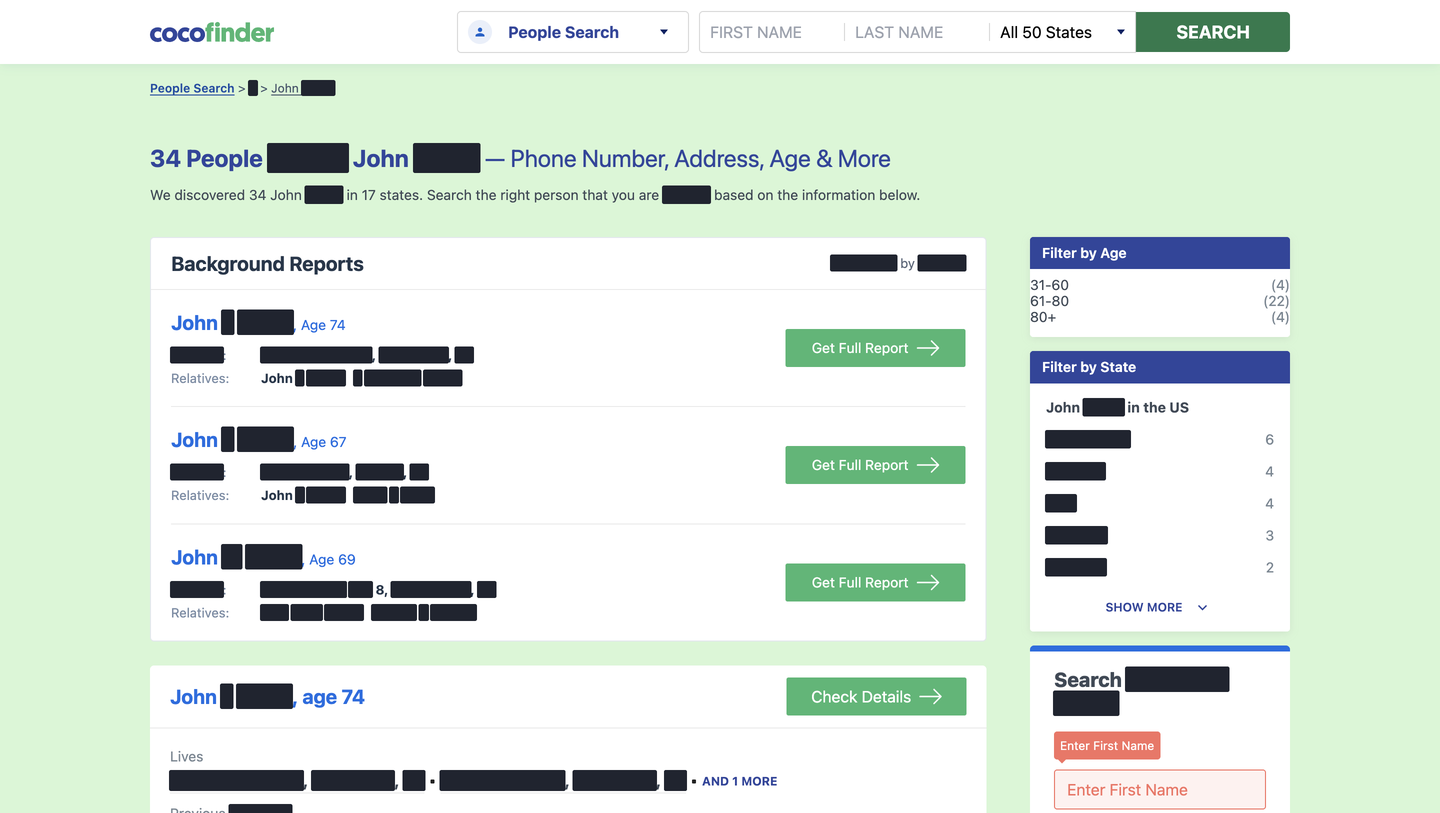
The page above is our own capture. Surnames and addresses are blacked out, as are the relatives. We use "John Smith" for these because it's the most common name in the country, which keeps everyone on the page anonymous, but the layout is what you'd see for your own name. The page on September 28 was headed "34 People Named John Smith" and said "We discovered 34 John Smith in 17 states." Filters down the side sort by age band and by state.
The first box on the page is labelled "Background Reports" and "Sponsored by Spokeo." It shows three matches with a street address and two relatives each, and a green "Get Full Report" button that links to spokeo.com. Below it come CocoFinder's own entries, and on the day we looked they held more than the version of this page we wrote in August described. Each entry shows:
- a name with a middle initial, an age, and a "Check Details" button
- a "Lives" line with two street addresses and an "AND 1 MORE" link
- "Previous Locations," two cities with a count of how many more
- "Relatives," two names with a count
- "Phone number," two full phone numbers with a count
- "Emails," two addresses with the first part starred out, and an "Unlock Email Address" link
That's the free layer. Nothing on the name page needs an account or a card.
The record page, and the tab that opens behind it
"Check Details" leads to a record page for one person, at an address shaped like cocofinder.com/name/john-smith/pa/john-l-smith- followed by a 24-character code. That full address is the one to send with a removal request. When we tried a shortened version of the code, the server returned a 404, so copy it whole.
Clicking "Check Details" also opened a TruthFinder search for the same name and city in a second tab, with utm_campaign=cocofinder in its address. The record page itself opens with a "Record summary" that counts what the site holds on the person. For the test record we opened, that meant 3 phone records and 6 address records. It also counted 9 email records and 2 relatives. Below that come sections for addresses (with a map) and phone numbers. Email follows, then relatives, then neighbours. An FAQ block at the bottom repeats the person's age and asks who lives on the same street. A table of contents also lists "Social Profiles."
The paid layer sits on top. "View Full Report," "Unlock Full Info," the "UNLOCK" links on older addresses and "Search More Email Addresses" all pointed at tracking.truthfinder.com. Further down, "Paid Result" boxes linked to TruthFinder and BeenVerified as well as Instant Checkmate. A row of "TRY NOW" buttons added Spokeo and Intelius. The FAQ page says CocoFinder has "no paywall on the data shown in CocoFinder listings." That's accurate as far as it goes. The starred-out emails and the older addresses behind "UNLOCK" are where the paywalls start, and they belong to other companies.
CocoFinder reverse phone lookup
The homepage FAQ says the reverse phone lookup returns "the likely owner's name, the carrier, the line type (mobile or landline), and any associated address history on file." We tested it with the number CocoFinder publishes for itself on its About page, so no private person was involved. The lookup produced no CocoFinder result page. The tab went to a PeopleLooker "Searching 844-578-4610" page, and a second tab opened on Instant Checkmate. Both addresses carried "cocofinder" as the referring tag. Your number may still show up on CocoFinder, because the name pages list phone numbers in full. It just isn't the phone tool that shows it.
Is CocoFinder legit?
It's a real site with real data. Nothing on it is sold by CocoFinder itself, so "is cocofinder legit" comes down to two other questions. One is whether the information is accurate. The other is whether the site is honest about what it's doing.
On honesty it does better than some. It says its own search is free and that the deeper reports belong to other companies, and it discloses the referral fees. Its FAQ page says partner links "are clearly labeled as sponsored," and the Spokeo box on the name page is labelled that way. The "Check Details" button isn't. A click on it opens a partner's search in a second tab without saying so first.
Some claims don't match what we saw. The homepage says "everything you do with CocoFinder will not be logged or shared." The TruthFinder tabs that opened during our session carried the searched name and location in their addresses, along with a CocoFinder campaign tag. The About page's "24x7" line sits a few inches above opening hours that close at 8:30 PM and all weekend. And the two addresses on the legal pages and the About page don't agree.
On accuracy, treat any listing as a machine's best guess. The FAQ page is candid about it: "Address and phone information from voter rolls and white-pages may be several years old," and "The most recent record on file is not a guarantee that an address or phone number is currently in use." It also says "Aliases and middle-name variations sometimes split a single person across two listings." The errors we see across every aggregator show up here too, from a former address listed as current to a tenant filed as a relative.
Is CocoFinder safe?
For the person searching, the site says a search can't be seen by the person searched: "We do not notify the person being searched." The risks sit elsewhere. Clicking through sends you to partner sites that sell subscriptions, and the TruthFinder page we landed on opened with a consent screen you must accept before it continues. Read the partner's price and renewal terms before you give it a card.
For the person listed, the concern is the exposure. Putting a person's phone numbers and street addresses on one public page next to their relatives is the raw material for doxxing, and for the family-emergency phone scams that need a relative's real name to land. The records were public before. The convenience is new.
Is it legal for CocoFinder to publish this?
Yes under federal law, with one boundary the site draws for itself. Its footer states that it "is not a consumer reporting agency per the Fair Credit Reporting Act," and that you "may not use our site or service or the information provided to make decisions about employment, admission, consumer credit, insurance, tenant screening or any other purpose that would require FCRA compliance." The Do's & Don'ts page repeats the point with a list of banned uses, from screening domestic help to insurance checks.
That disclaimer works in the company's favour. Because it's not a consumer reporting agency, the Fair Credit Reporting Act's accuracy rules and dispute rights don't reach it. The FAQ page says so plainly. An FCRA check comes with "dispute and correction procedures," and "CocoFinder does not provide any of those guarantees and does not meet FCRA requirements." If a listing about you is wrong, nobody is obliged to investigate.
The public records underneath are lawful to republish, and the homepage FAQ notes that "Removal from CocoFinder does not remove the underlying public record from its original government source." The terms add their own limits. They are governed by Pennsylvania law, and they cap the company's liability at what you paid "or 100 USD if You haven't purchased anything through the Service."
What being listed here means for you
The name pages are built to rank. They're static and indexed. Each is titled with the person's name, so a search for you can surface one. The footer also publishes a "Top 1000 Name Searches" list for each recent day, which gives search engines one more path into the name pages. Anyone who lands on yours gets your age and two street addresses without logging in. Two phone numbers and two relatives come with them.
Searching is anonymous by the site's own account, so you'll never know who has looked. For most people the practical cost is unwanted calls and a nagging exposure. If you have a stalker or a hostile ex, or a job that puts your name in public, it's a page worth removing now rather than later.
CocoFinder opt out: how to remove yourself from CocoFinder
Removal is free and needs no account. The Remove My Info page says "Opting out of our database never costs you a dime" and that non-members can opt out too. The complication is the form.
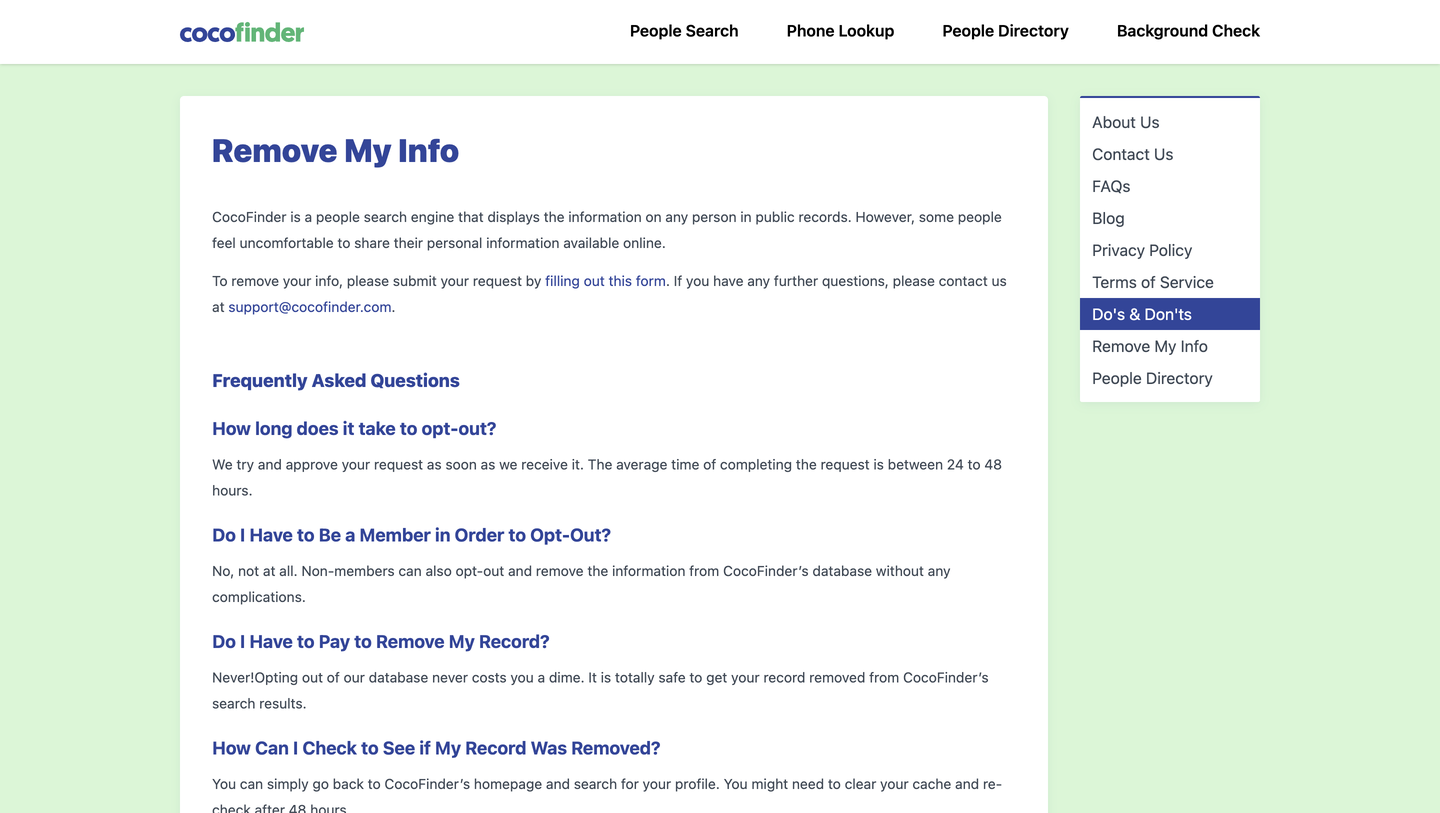
The page, captured above, tells you to "submit your request by filling out this form." That link goes to a Google Form, and Google has taken the form down. Opening it returns an error saying "You can't access this item because it is in violation of our Terms of Service." We first confirmed that on August 26, 2026. The same error came back on September 6 and again on September 28. The Contact Us page links to the same dead form. This is the fastest-decaying fact on this page, so try the form first. The company may have fixed or replaced it by the time you read this.
| Path | Status on September 28, 2026 | What to do |
|---|---|---|
| Linked Google Form | Down (Terms of Service error) | Try it anyway; if it loads, use it |
| Email to support@cocofinder.com | Listed on the removal page, the privacy policy and the Contact Us page | Send your full name as it appears and the exact record URL |
The email is the path that works. The steps:
- Open cocofinder.com/name/your-first-your-last and find your entry by age and city. The relatives row helps rule out a namesake.
- Click "Check Details." Close the partner tab that opens behind it, and copy the full record-page address, code included, from the address bar.
- Email the support address with your full name as the listing shows it and the record URL, asking for the record to be removed from CocoFinder's search results.
- If you appear more than once (under a nickname, or a second entry with an older address), send each record URL.
If you're filing for a relative, the removal page says "you will require an admissible written authorization request from that person." Mention in the email that you have it.
Our CocoFinder opt-out guide covers each step with captures. For the wider job across every site you've turned up on, see our guide to removing your personal information from the internet.
How long CocoFinder removal takes
The site gives two answers. The Remove My Info page says "The average time of completing the request is between 24 to 48 hours." The FAQ page says CocoFinder processes opt-outs "typically within 48 to 72 hours of verification." Neither page says what verification involves, and no confirmation email or link is part of the process. Plan on three days, then look for yourself.
To check, the removal page suggests you "go back to CocoFinder's homepage and search for your profile" and adds "You might need to clear your cache and re-check after 48 hours." Going straight to your name page is quicker and doesn't open a partner tab. A quiet inbox doesn't mean the request failed. The only proof is a name page without your entry on it.
Removing yourself from the partner sites
A CocoFinder removal takes the record off CocoFinder. The Spokeo and TruthFinder reports its buttons sell are separate databases, and your listing on them stays until you file there. TruthFinder shares one suppression flow with Instant Checkmate and Intelius, covered in our PeopleConnect profile and the TruthFinder opt-out guide. Spokeo has its own opt-out.
Does California's DROP reach CocoFinder?
Not as things stand. The Delete Request and Opt-out Platform lets a California resident send one deletion request to "over 600 registered data brokers," and since August 1, 2026 those brokers must check it at least once every 45 days. The key word is registered. DROP works through the registry, and CocoFinder isn't in it, so a DROP request never reaches it. Our DROP explainer covers how to file.
DROP is still worth doing if you live in California, because it reaches the registered brokers that feed and sell the paid reports CocoFinder links to. For CocoFinder itself, the email is the only route we know of.
The statute does carry a penalty for a data broker that should have registered and didn't: "two hundred dollars ($200) for each day," plus the fees it should have paid (Civil Code 1798.99.82). In August and September 2026 the agency fined at least three brokers over late or missing registration. Cybba and SalesIntel Research were two of them. Whether CocoFinder is one that should have registered isn't something the public record settles.
Common questions about CocoFinder
Is CocoFinder free?
Its own search and name pages are free. You need no account and no card. The FAQ page says "There is no subscription, no per-search fee, no required account." The "Get Full Report," "View Full Report" and "UNLOCK" buttons lead to paid reports from partner companies. Opting out is free.
Why is my information on CocoFinder?
Its homepage FAQ says it builds listings from government filings and court records, among other public sources such as voter rolls. The FAQ page says it "does not collect data from private sources, social media scraping, or paid data brokers that resell non-public information." You were never asked.
Does a CocoFinder search notify the person?
No. The site says searches are anonymous and the person searched isn't told. It also says "we do not display the searcher's identity in any listing."
What is the CocoFinder phone number?
The About page lists +1 844 578 4610, with hours of Monday to Friday, 7:00 AM to 8:30 PM. For removal, email is the channel the site names. The only address on the removal page is support@cocofinder.com.
How long does removal take?
The removal page says 24 to 48 hours on average. The FAQ page says 48 to 72 hours. With no confirmation step you have to check for yourself.
Will my CocoFinder listing come back?
It can. The FAQ page lists reasons a person may be missing, among them that "the source has not refreshed." The reverse also happens. A new public record, such as a move or a new phone number, can create a fresh entry with a different record code that your earlier request never touched. That re-listing cycle is why one removal is rarely the end. Check your name page every few months, and send a new email naming the new record URL if one appears.
Is coco finder the same as cocofinder.net?
Yes. The spaced spelling is just how people type it, and cocofinder.net redirects to cocofinder.com.
A dead form and no confirmation loop make CocoFinder the kind of removal that needs a follow-up nobody remembers to make. Delist My Data is being built to make it on CocoFinder and the other people-search sites, and to re-send the request when the listing reappears. We're in pre-launch; the waitlist is open.